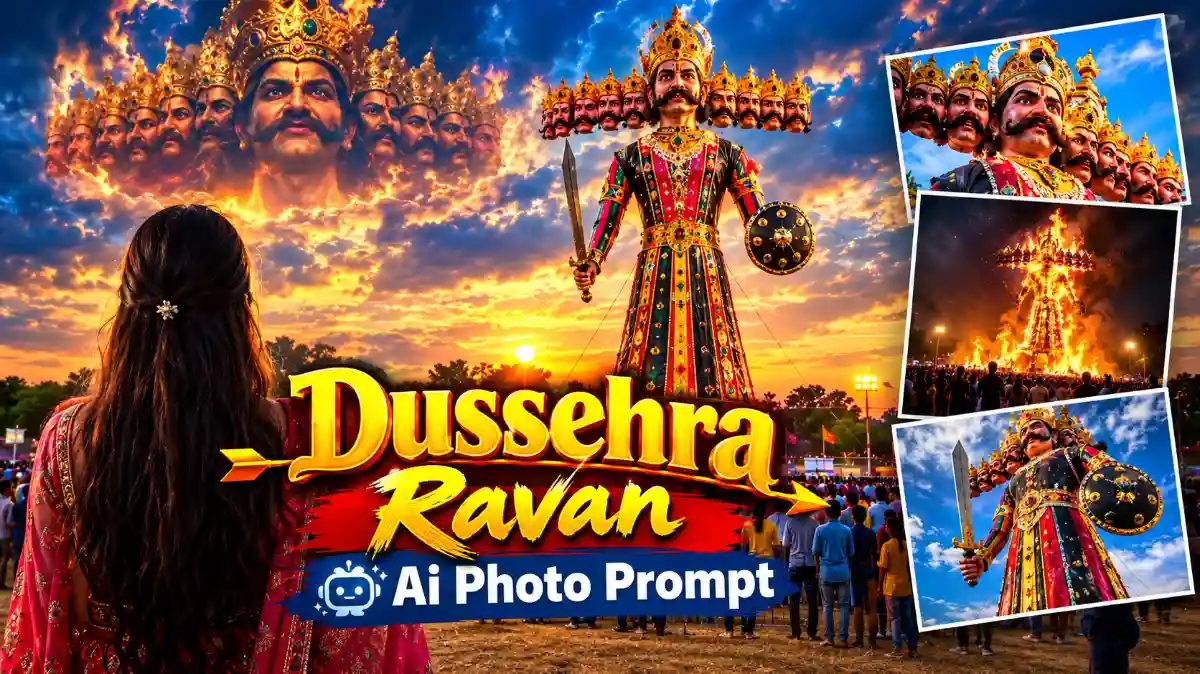
आजकल Instagram पर Ravan Dussehra AI Photo काफी ज्यादा ट्रेंडिंग में चल रही है। अगर आप भी Dussehra के मौके पर अपनी फोटो को रावण थीम में AI की मदद से क्रिएट करना चाहते हैं, तो यह आर्टिकल आपके लिए उपयोगी है। यहां हम आपको ChatGPT का इस्तेमाल करके दशहरा रावण AI Photo बनाने का आसान तरीका बताएंगे। इसके लिए आपको केवल अपनी एक फोटो और एक सही AI Prompt की जरूरत होगी।
Ravan Dussehra AI Photo कैसे बनाएं | ChatGPT Image Editing Prompt
गाइस, अभी के टाइम Instagram पर Ravan Dussehra AI Image काफी ज्यादा ट्रेंडिंग में चल रही है। फ्रेंड्स, आज आपको ChatGPT का यूज करके इस टाइप की दशहरा AI Photo बनाना सिखाऊंगा। इसके लिए आपको एक Prompt पेस्ट करना होगा, जिसके बाद आपकी इस टाइप की दशहरा रावण AI Photo क्रिएट हो जाएगी।

Create a highly realistic cinematic Dussehra festival scene in India during sunset, in a vertical 9:16 composition. Use the uploaded person as the main foreground subject. Preserve the person’s exact identity, face, hairstyle, skin tone, body proportions and natural appearance. Show the person from behind, standing in an open Dussehra ground with both hands naturally clasped behind the back, wearing a simple white T-shirt, blue jeans and casual sandals. In the background, create a massive traditional Ravan effigy standing in the center, with ten clearly visible heads, an elaborate golden crown, traditional royal Indian clothing, detailed ornaments, holding a sword in one hand and a round shield in the other. Place two slightly smaller Ravan effigies symmetrically on the left and right sides. Show a large crowd of people watching the Ravan effigies from a distance, festival lights and illuminated stalls around the ground, realistic Indian Dussehra celebration atmosphere. The sky should have a spectacular golden-orange sunset with dramatic scattered clouds, warm glowing sunlight behind the Ravan effigies, cinematic atmospheric lighting and natural shadows. Add a small white cartoon-style thought bubble above the central Ravan’s head, with empty space inside. Ultra-realistic photography, realistic human proportions, natural skin texture, detailed clothing, realistic crowd, realistic giant effigies, cinematic depth, HDR, high dynamic range, warm sunset tones, DSLR photography, sharp details, subtle film grain, 4K, photorealistic, highly detailed, natural colors. Do not make it cartoonish or Al-looking. Do not distort the person’s body, hands or clothing. Keep the composition balanced and realistic.
Ravan Dussehra AI Photo बनाने का तरीका
तो चलिए स्टार्ट करते हैं। दशहरा रावण AI Photo बनाने के लिए फ्रेंड्स, हम ChatGPT का यूज करेंगे।
- इसके लिए सबसे पहले आपको Google पर ChatGPT वेबसाइट सर्च करनी है।
- Google पर सर्च करने के बाद आपको ChatGPT की वेबसाइट दिखाई देगी। आपको इस वेबसाइट पर क्लिक करना है।
- जैसे ही आप वेबसाइट पर क्लिक करेंगे, आपके सामने इसका इंटरफेस ओपन हो जाएगा।
- वेबसाइट ओपन होने के बाद आपको प्लस (+) आइकन का ऑप्शन मिलेगा। आपको इस प्लस आइकन पर क्लिक करना है।
- जैसे ही आप यहां क्लिक करेंगे, इसके बाद आपको फोटो का ऑप्शन मिलेगा। आपको इस फोटो ऑप्शन पर क्लिक करना है।
- इसके बाद आपको कलेक्शन में जाना है। कलेक्शन में जाने के बाद फ्रेंड्स
- आपको गैलरी में जाना है और यहां से अपनी एक फोटो अपलोड करनी है।
- अगर आप गर्ल्स की फोटो के साथ इस तरह की AI Photo बनाना चाहते हैं, तो आप यहां पर गर्ल्स की फोटो ऐड कर सकते हैं।
- फोटो सेलेक्ट करने के बाद आपको Done ऑप्शन पर क्लिक करना है।
- जैसे ही आप Done ऑप्शन पर क्लिक करेंगे, आपकी फोटो यहां पर अपलोड हो जाएगी।
ChatGPT में Ravan AI Photo Prompt कैसे डालें?
- फोटो अपलोड होने के बाद आपको इसी के नीचे Ask Anything का ऑप्शन मिलेगा।
- फ्रेंड्स, यहां पर आपको एक Prompt ऐड करना है। यह Prompt आपको इसी आर्टिकल के अंदर देखने को मिलेगा।
- इसके बाद आपको Prompt को कॉपी करके यहां पर पेस्ट करना है। जैसे ही आप Prompt पेस्ट करेंगे।
- इसके बाद आपको नीचे Enter का ऑप्शन मिलेगा। आपको इस Enter ऑप्शन पर क्लिक करना है।
- जैसे ही आप Enter ऑप्शन पर क्लिक करेंगे, आपकी इमेज बनना स्टार्ट हो जाएगी।
- अगर पहली बार में इमेज क्रिएट नहीं होती है, तो आपको फिर से Try Again पर क्लिक करना है।
इसके बाद आप देख सकते हैं कि आपकी इमेज क्रिएट होना स्टार्ट हो जाएगी। आपको इमेज बनने तक इंतजार करना है। कुछ समय बाद आपकी इमेज बनकर तैयार हो जाएगी।
Ravan Dussehra AI Photo सेव कैसे करें?
फ्रेंड्स, आप कुछ इसी तरीके से इस टाइप की इमेज बना सकते हैं, जो देखने में काफी ज्यादा यूनिक और एकदम सेम लग रही है। इसके बाद आपको इस फोटो को सेव करना है। इसके लिए सबसे पहले आपको अपनी बनाई गई फोटो पर क्लिक करना है। फोटो पर क्लिक करने के बाद आपको Save का ऑप्शन मिलेगा। आपको इस Save ऑप्शन पर क्लिक करना है। इसके बाद आपकी इमेज सेव हो जाएगी।
निष्कर्ष
इस तरह आप ChatGPT की मदद से आसानी से Ravan Dussehra AI Photo बना सकते हैं। इसके लिए आपको अपनी फोटो अपलोड करनी है, सही Prompt पेस्ट करना है और AI इमेज तैयार होने का इंतजार करना है। अगर आप भी Instagram पर ट्रेंडिंग दशहरा AI फोटो बनाना चाहते हैं, तो इस तरीके को आजमा सकते हैं