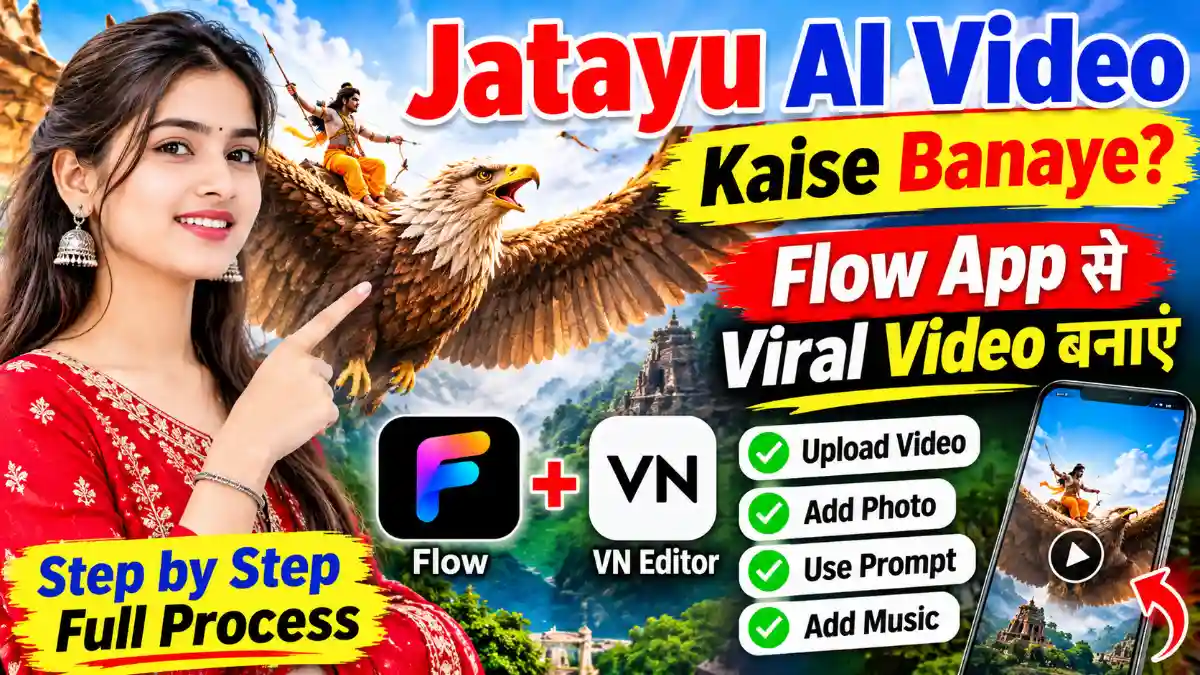
The Trending Jatayu AI Prompt: Jatayu AI Video Kaise Banaye? Flow Application और VN Editor की मदद से अपनी Photo से Instagram पर वायरल हो रही Realistic Jatayu AI Reels बनाने का आसान तरीका जानें।
Jatayu AI Video Kaise Banaye | Flow AI Application से वायरल Instagram Reels बनाएं
आजकल Instagram Reels पर Jatayu वाली AI Video काफी ज्यादा वायरल हो रही है। इस तरह की वीडियो लोगों को बहुत पसंद आ रही हैं। अगर आप भी अपनी फोटो की मदद से ऐसी ही Realistic Jatayu AI Video बनाना चाहते हैं, तो इस आर्टिकल में हम आपको पूरा Process बताने वाले हैं।

इस AI Video को बनाने के लिए हम Flow Application की मदद लेंगे। इसकी सहायता से आप अपनी फोटो और एक Reference Video का इस्तेमाल करके आसानी से AI Video Create कर सकते हैं।
Use the uploaded image as the exact starting frame. Create a photorealistic, emotionally powerful Indian mythological cinematic sequence.
1. ABSOLUTE CAMERA LOCK
– Camera must remain completely stationary throughout the entire video.
– No zoom, pan, tilt, rotation, shake, or reframing.
– Preserve the exact original camera angle, framing, perspective, and composition.
– Do not change the original sky, buildings, horizon, or environment.
2. STRICT BOY POSE LOCK
The boy in the foreground must remain completely frozen in his exact original pose.
– Preserve his exact body position and silhouette.
– Both arms must remain extended sideways at exactly the same angles.
– Hands, fingers, palms, legs, head, and torso must not move.
– Do not change his posture, proportions, clothing, or position.
– No breathing animation or body movement.
– The boy must remain identical to the original reference image in every frame.
IMPORTANT: The boy is a completely static foreground subject. Only Jatayu Ji and the smaller birds are allowed to move.
3. PRESERVE ORIGINAL LIGHTNING AND LIGHTING
– Preserve the original lightning exactly as it appears in the reference.
– Do not remove, replace, redesign, or add new lightning.
– Maintain the same lightning patterns, brightness, color, and position.
– Do not change the original sky lighting or overall color grading.
– No new dramatic lighting effects.
4. JATAYU JI: DIVINE HUMAN-LIKE MYTHOLOGICAL DESIGN
Jatayu Ji must look like a majestic, divine mythological being, not an ordinary eagle.
Create an original cinematic mythological design with:
– A powerful eagle-like head and noble facial structure.
– Subtle human-like facial characteristics and expressive eyes.
– A wise, courageous, protective, and emotionally expressive presence.
– A dignified expression that conveys bravery, compassion, and sacrifice.
– A majestic humanoid-bird anatomy, combining powerful human-like proportions with enormous realistic feathered wings.
– Detailed brown and golden feathers, powerful shoulders, and a regal mythological appearance.
His face should communicate emotion and intelligence, as if he is a conscious divine guardian rather than an ordinary animal.
Keep his appearance believable, majestic, and photorealistic.
5. ONE SINGLE POWERFUL WING FLAP: FAST TO SLOW MOTION
This is extremely important. Jatayu Ji must perform only ONE powerful wing flap during the entire sequence.
– Initially, Jatayu Ji is hidden below the bottom edge of the frame.
– He suddenly rises upward from below the frame with one strong, powerful wing flap.
– His wings spread outward during this single upward movement.
– His initial ascent is fast, energetic, and powerful.
– As he reaches the upper-middle background, the movement smoothly transitions into dramatic slow motion.
– He fully extends both enormous wings into a majestic wide-wing flying pose.
– Once he reaches this position, he stops flapping completely.
– He remains suspended in the sky with both wings fully spread.
– Only extremely subtle feather movement and natural air resistance are allowed.
NO repeated wing flapping. NO continuous flapping. NO rapid bird-like fluttering. ONE FLAP ONLY, THEN HOLD THE FINAL POSE.
6. SMALL BIRDS
Several smaller birds accompany Jatayu Ji during his entrance.
– They fly upward around him naturally.
– Keep their movement subtle and cinematic.
– A few birds may pass behind his enormous wings.
– Do not overcrowd the frame.
– Their motion should complement Jatayu Ji’s grand arrival.
7. TIMING
– 0–1 second: Original scene, boy perfectly frozen.
– 1–2.5 seconds: Jatayu Ji makes one powerful upward flight with a single wing flap.
– 2.5–4 seconds: His ascent smoothly slows down as both wings extend fully.
– 4–6 seconds: Jatayu Ji holds his majestic wide-wing pose in the sky. No more flapping.
8. STRICT NEGATIVE PROMPT
No boy movement, no pose changes, no arm movement, no hand movement, no body animation, no camera movement, no composition changes, no lightning changes, no repeated wing flapping, no rapid fluttering, no ordinary eagle appearance, no cartoon anatomy, no distorted human-like face, no malformed wings, and no excessive bird movement.
FINAL RESULT
A breathtaking Indian mythological motion-poster shot. The boy remains perfectly motionless in his original pose while a majestic, emotionally expressive, divine Jatayu Ji rises from below with one powerful wing flap. His movement transitions from fast to slow motion, and he finally holds a magnificent wide-wing pose in the sky, surrounded by a few smaller birds.
Camera: 100% locked
Boy: 100% pose locked
Lightning: Original and unchanged
Jatayu Ji: Human-like divine mythological appearance
Wing movement: One powerful flap only
Final pose: Wings fully spread and held still
Duration: 6 seconds
Jatayu AI Video बनाने के लिए क्या जरूरी है?
इस तरह की AI Video बनाने के लिए आपको कुछ चीजों की जरूरत पड़ेगी।
- Flow Application
- एक Gmail Account
- अपनी एक अच्छी Quality की Photo
- Jatayu Reference Video
- AI Video Prompt
- इंटरनेट कनेक्शन
Reference Video और Prompt आपको हमारे Telegram Channel पर मिल जाएगा। इसका लिंक आपको इसी आर्टिकल में दिए गए लिंक के माध्यम से मिल सकता है।
Flow Application से Jatayu AI Video कैसे बनाएं?
अब जानते हैं कि Flow Application की मदद से Jatayu वाली Viral AI Video कैसे Create करनी है। इसके लिए नीचे बताए गए सभी Steps को Follow करें।
Step 1: Flow Application Install करें
सबसे पहले आपको अपने मोबाइल में Flow Application डाउनलोड करना होगा। यह Application आपको Play Store पर आसानी से मिल जाएगा। Application Install करने के बाद अपने मोबाइल का Internet Data On कर लें और Flow Application को Open करें।
Step 2: Gmail से Sign Up करें
Flow Application Open करने के बाद आपको किसी भी एक Gmail Account की मदद से Sign Up करना होगा। Sign Up की प्रक्रिया पूरी होने के बाद आपके सामने Application का Interface Open हो जाएगा। अब आपको यहां New पर क्लिक करना है। इसके बाद बीच में Upload का Icon दिखाई देगा, उस पर क्लिक करें और फिर Video के Option को Select करें।
Step 3: Jatayu Reference Video Upload करें
अब आपको Jatayu वाली Reference Video Select करनी है। यह Reference Video आपको हमारे Taja Info.Cv वेबसाइट पर मिल जाएगी। वहां से आप इसे Save कर सकते हैं। Video Select करने के बाद Done पर क्लिक कर दें। इसके बाद आपकी Video Upload होना शुरू हो जाएगी। Upload Process पूरा होने तक थोड़ा इंतजार करें।
Step 4: अपनी Photo Upload करें
Reference Video Upload होने के बाद आपको अपनी एक Photo भी Upload करनी होगी।
- सबसे पहले ऊपर Search Icon के साइड में दिए गए Upload Icon पर क्लिक करें।
- इसके बाद Images के Option पर क्लिक करें।
- अब अपनी एक अच्छी Photo Select करें।
- Photo Select करने के बाद Done पर क्लिक कर दें।
- अब आपकी Photo Upload होना शुरू हो जाएगी।
कुछ समय इंतजार करने के बाद आपकी Photo और Reference Video दोनों Upload हो जाएंगी।
Step 5: Library से Video और Photo Select करें
अब आपको नीचे Plus (+) का Icon दिखाई देगा। इस पर क्लिक करके Library के Option में जाएं।
- सबसे पहले Library में जाकर अपनी Reference Video Select करें।
- इसके बाद Next पर क्लिक करें।
- अब दोबारा Plus (+) Icon पर क्लिक करें।
- फिर Library में जाकर अपनी Upload की गई Photo Select करें।
इस प्रकार आपकी Reference Video और Photo दोनों Select हो जाएंगी।
Step 6: AI Prompt Paste करें
अब आपको यहां एक Prompt Paste करना होगा। यह Prompt आपको हमारे Taja Info.Cv पर मिल जाएगा। वहां से आप इसे आसानी से Copy कर सकते हैं। Prompt Copy करने के बाद Application में दिए गए Prompt Box में Paste कर दें।
Step 7: AI Video की Settings करें
अब नीचे दिए गए Box में Arrow के साइड में मौजूद Settings Option पर क्लिक करें। यहां आपको कुछ जरूरी Settings करनी होंगी।
- Ratio: 16:9 Select करें।
- Resolution: 720p Select करें।
- Speed: 1x पर रखें।
सभी Settings पूरी करने के बाद Arrow पर क्लिक कर दें।
Step 8: AI Video Generate करें
जैसे ही आप Arrow पर क्लिक करेंगे, आपकी AI Video Create होना शुरू हो जाएगी। अब आपको कुछ समय इंतजार करना होगा। Processing पूरी होने के बाद आपकी Jatayu AI Video तैयार हो जाएगी। अब आप इसे Play करके देख सकते हैं कि आपकी Photo के साथ AI Video कैसी दिखाई दे रही है।
Step 9: AI Video Save करें
अगर आपको तैयार की गई AI Video पसंद आती है, तो इसे Save करने के लिए Video पर Tap करके रखें। इसके बाद Save के Option पर क्लिक कर दें। अब आपकी AI Video मोबाइल में Save हो जाएगी। अगर आप इस Video से Watermark Remove करना चाहते हैं, तो इसके लिए अलग से जानकारी दी गई है। उसका लिंक आपको इसी आर्टिकल में मिल जाएगा।
Step 10: Video में Music Add करें
AI Video Save करने के बाद अब आपको इसमें Music Add करना होगा। इसके लिए आप किसी भी Editing Software का इस्तेमाल कर सकते हैं। यहां हम VN Application का इस्तेमाल कर रहे हैं।
- सबसे पहले VN Application Open करें।
- अब अपनी Save की गई AI Video को Import करें।
- ऊपर दिए गए Music Option पर Tap करें।
- इसके बाद Music में जाकर My Music Option Select करें।
- यहां से अपनी पसंद का Music Select करके Add कर लें।
- Music Add होने के बाद Tick पर क्लिक करें।
- अब Original Video का Volume कम या Mute कर दें।
- इसके बाद Tick पर क्लिक करके ऊपर Export के Option पर जाएं।
- दोबारा Export पर क्लिक करें।
अब आपकी Jatayu AI Video Music के साथ तैयार हो जाएगी और मोबाइल में Save हो जाएगी।
निष्कर्ष (Conclusion)
इस प्रकार आप Flow Application और VN Editing Software की मदद से अपनी Photo का इस्तेमाल करके Jatayu वाली Viral AI Video आसानी से बना सकते हैं। इसके लिए आपको केवल Reference Video, अपनी Photo और सही Prompt की जरूरत होगी।
उम्मीद है कि हमारे द्वारा दी गई यह जानकारी आपको पसंद आई होगी। अगर यह आर्टिकल Helpful लगा हो, तो इसे अपने दोस्तों के साथ जरूर Share करें। इसी तरह के नए AI Photo Editing और AI Video Creation से जुड़े Updates पाने के लिए हमारे साथ जुड़े रहें। धन्यवाद!